

Description
LLM Friendly adds two capabilities to your WordPress site:
1) /llms.txt
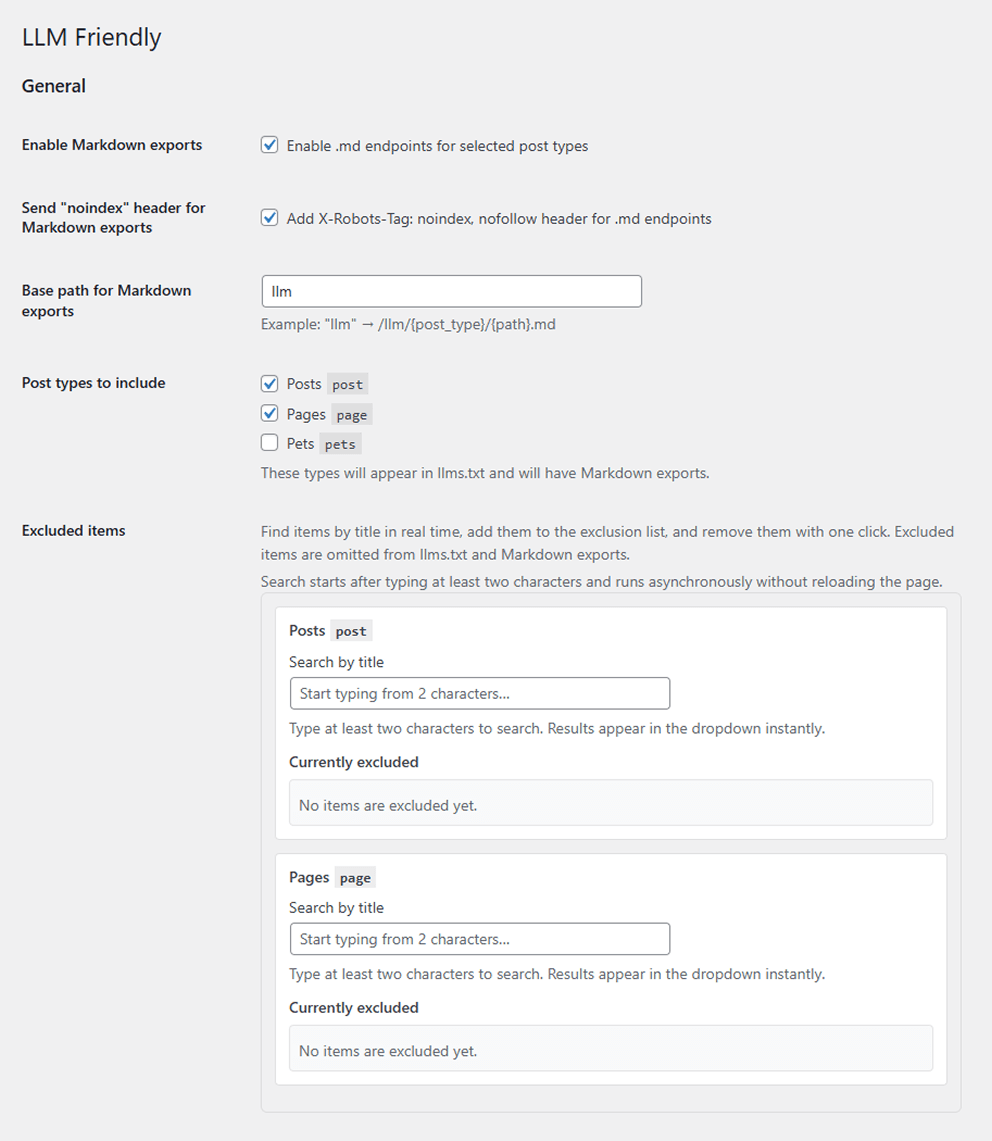
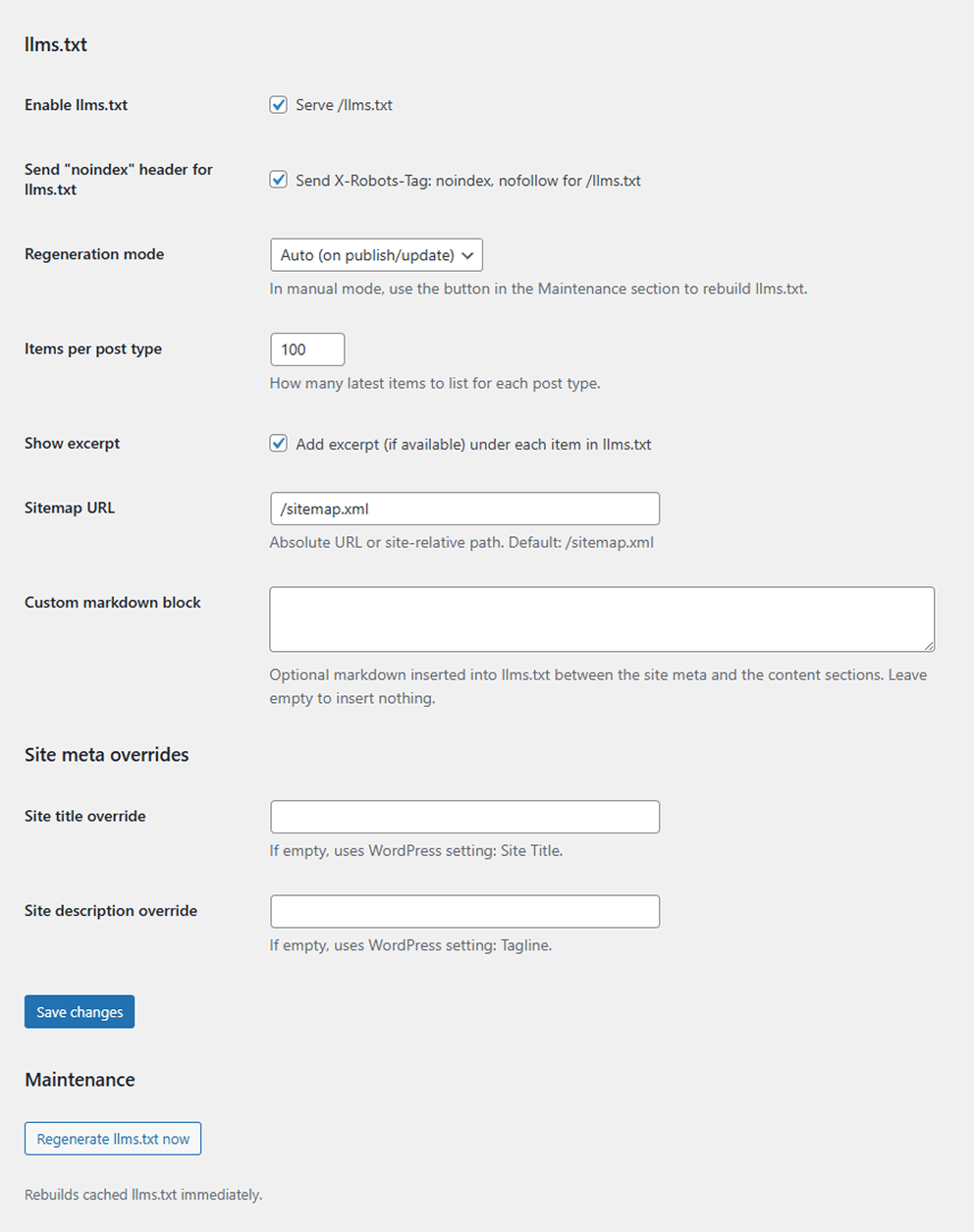
An LLM-friendly index of the website with main links and a list of latest items per post type. You can show AI-facing one-line descriptions and exclude individual entries from the feed via Settings LLM Friendly.
2) Markdown exports
For selected post types, the plugin exposes .md endpoints under:
{base}/{post_type}/{path}.md
Entries include a JSON metadata block with title, URL, dates, language, description, author, and publisher. They can override their Markdown body and one-line LLM description via the “Markdown override (LLM Friendly)” editor metabox.
This is useful for LLMs, indexing bots, and users who prefer plain text.
You can opt in to descriptions in llms.txt via llms_show_excerpt, and you can send X-Robots-Tag: noindex, nofollow for Markdown exports via md_send_noindex if you want Markdown-only consumers without search engine indexing.
If the automatic Markdown conversion does not fit a post, use the “Markdown override (LLM Friendly)” editor metabox to provide a custom Markdown or block-based replacement. In Gutenberg it appears with the editor’s additional panels/metaboxes.
Key features
- llms.txt endpoint with cached generation, optional AI-facing descriptions, a configurable custom Markdown block, and a per-post exclusion list.
- Markdown exports for selected post types with Gutenberg-to-Markdown conversion, expanded JSON metadata, per-post Markdown overrides, and a per-post exclusion list shared with llms.txt.
- Configurable base path for exports (e.g. “llm”) and per-post-type enable/disable toggles; changing the base path requires flushing rewrites.
- Manual or automatic regeneration of the cached llms.txt with ETag/Last-Modified headers.
- Optional X-Robots-Tag: noindex, nofollow for both /llms.txt and Markdown exports; the Markdown header is controlled by
md_send_noindex. - Toggle descriptions in llms.txt via
llms_show_excerptto add one-line summaries under each item. - Optional site title/description/author overrides plus a same-site sitemap URL field for generated outputs.
Requirements
- WordPress 6.0+
- PHP 7.4+
If requirements are not met, the plugin displays an admin notice and does not run.
Development
Run composer run lint to syntax-check the plugin PHP files.
See TESTING.md for WordPress integration scenarios.
Developer Notes
llmf_can_export_postcan deny a post formarkdown,llms, orllms_searchcontexts.llmf_markdown_override_max_lengthchanges the per-post Markdown override length cap. Default: 200000 characters.llmf_llms_description_max_lengthchanges the per-post llms.txt description length cap. Default: 500 characters.llmf_markdown_metadatafilters the JSON metadata array emitted at the top of each Markdown export.llmf_max_excluded_posts_per_typechanges the per-post-type exclusion cap. Default: 500.llmf_allow_external_sitemap_urlallows an external sitemap URL when returningtrue.- Users without
unfiltered_htmlhave custom Markdown sanitized with WordPress KSES.
Screenshots
Installation
- Upload the plugin to the /wp-content/plugins/ directory, or install it through the WordPress plugins screen.
- Activate the plugin through the ‘Plugins’ screen in WordPress.
- Go to Settings LLM Friendly.
- Enable llms.txt and/or Markdown exports, choose post types, configure base path (optional).
- Save changes.
- If you changed the base path or endpoints, re-save Permalinks if your server has custom rewrite rules.
FAQ
-
Where is llms.txt stored?
-
The plugin serves llms.txt dynamically via WordPress. It is not a physical file on disk.
-
Markdown exports return 404. Why?
-
Most often this is a rewrite or web-server routing issue. If you run Nginx in front of Apache, make sure .md requests are routed to WordPress (not handled as static files).
When you change the base path, flush permalinks and confirm that.mdand/llms.txtare not short-circuited by static file rules. -
How do I keep Markdown out of search results?
-
Enable the “Send X-Robots-Tag: noindex, nofollow for Markdown” option (stored as
md_send_noindex) to emit the header on all Markdown responses. -
Can I ship a custom Markdown body, description, or exclude a single item?
-
Yes. Open the post editor and use the “Markdown override (LLM Friendly)” metabox. In Gutenberg it appears with the editor’s additional panels/metaboxes. The override accepts plain Markdown or block markup, and the llms.txt description field provides a one-line summary for llms.txt and Markdown metadata. If you want to hide a specific entry from llms.txt and Markdown exports, go to Settings LLM Friendly llms.txt “Excluded items”, search by title, and add it to the exclusion list.
-
Can I use an external sitemap URL?
-
By default, the sitemap field accepts site-relative paths and same-site absolute URLs. External sitemap URLs are rejected unless a developer opts in with the
llmf_allow_external_sitemap_urlfilter.
Reviews
There are no reviews for this plugin.
Contributors & Developers
“LLM Friendly” is open source software. The following people have contributed to this plugin.
Contributors
“LLM Friendly” has been translated into 1 locale. Thank you to the translators for their contributions.
Translate “LLM Friendly” into your language.
Interested in development?
Browse the code, check out the SVN repository, or subscribe to the development log by RSS.