
Description
Easily create the most optimized and error-free Google Shopping Product Feed or Google Merchant Feed, Facebook Catalog Feed, Pinterest Shopping Feed, InstagramCatalog Feed, TikTok Catalog, Snapchat Catalog, eBay Ads, Bing Ads, PriceRunner, Rakuten, PriceSpy, Kelko, & 100+ more channels for your WooCommerce Store.
This WooCommerce product feed Manager Plugin supports over 100+ recognized channels. Hence, you can reach out to any marketplaces, search engines, affiliate sites, or price comparison sites to extensively promote your products to the customers.
Creating a WooCommerce product feed using CTX Feed – a WooCommerce Product Feed Manager Plugin – has become easier than ever. Struggle no more in creating the most perfect and subtle product feed for your designated and preferred marketing channels for internationally prominent marketplaces, along with other notable ones as well.
It aims to reduce your hardship on marketing efforts to create product feeds and distribute them in multiple marketing/shopping channels. There are flexible options to update product information according to your given schedule and sync the update to the right channel via HTTP or FTP/SFTP. Stay at ease knowing that your customers will automatically get the latest product information.
WooCommerce Google Shopping Product Feed – Video Tutorial
Read Step by Step Documentation and Video Tutorial
For Support Email to support[@]webappick.com
Request New Feature Here
Try Premium Version: CTX Feed Pro
WHY SHOULD YOU USE THIS WOOCOMMERCE PRODUCT FEED PLUGIN?
CTX Feed is the best WooCommerce product feed plugin, and we proclaim it because we are the first pioneering plugin builder when it comes to creating a Product Feed for WooCommerce. We have been in the industry long enough to understand how WooCommerce feed works. That’s why we have introduced all the WordPress-Goers with our robust and revolutionary features that could facilitate your product uploading experience and get you rid of any trouble you face, such as uploading rejection or lack of necessary marketing channels’ attributes or inability to translate into a correct language or currency, etc.
Over the years of experience and expertise, we have curated all the factors that most online vendors face while creating the feed. You may not customize the product’s description or title properly. Also, the image links for the multiple variations of the same products may not function properly. Besides, making the feed in CSV format requires you to enter the data in the spreadsheet, resulting in a massive draining of your energy. If you need to create two feed files using CSV and XML format, the immediate transitions do not happen concurrently.
Here, our CTX Feed – WooCommerce Product Feed Plugin solves all the problems by giving you an ad-hoc solution. You can also format any attributes based on the output type that we have provided. We didn’t create those outputs by accident; we got them created from the feedback you all raised once encountering the issues. Hence, our tailored solutions can solve simple problems like formatting the price listing from two decimal to any decimals while giving the option to apply an integer. At the same time, this user-friendly plugin provides valuable identifiers add-on options to avoid any mismatch between the same brand’s products.
Let’s jump deeper into the ample features this mighty plugin has to offer:
☞ UNLIMITED PRODUCTS
No matter what the size of your inventory is, you can upload all of your products with no restriction imposed. From hundreds to thousands, you can upload unlimited products of your online store into any of the channels mentioned above, and that too with subtlety.
☞ UNLIMITED FEED
Like unlimited products uploading, you can make an infinite number of feeds containing any number of products of any sized store. You can access all the product feed files from the Manage Feeds option. To find the right feed out of a massive collection of feeds, you can look at the unique name of the feed instead of looking at the URL for your convenience.
💯100+ PRE-CONFIGURED TEMPLATES 💯
With our pre-configured 100+ built-in templates, you can make product feed within minutes without having to take excess pressure in researching every individual attribute or necessary field requirements of the known channels. It is time-consuming and bothersome to some extent. Besides, it is of no guarantee that your gleaned attributes will match precisely with the channels’ requirement, as some might change or some might turn from optional to compulsory.
Therefore, it is worth playing it safe to take advantage of our ready-made templates crafted extensively for the desired marketplaces.
☞ SUPPORTS ANY PRODUCT FEED FILE TYPE
This stellar WooCommerce product feed manager create the Product Feed for WooCommerce into 5 different feed file formats, the highest compared to any WooCommerce feed generator out there. The types are;
- XML Product Feed
- CSV Product Feed
- TSV Product Feed
- XLS Product Feed
- TXT Product Feed
- JSON Product Feed
These 5 types ensure that you create a product feed that appears differently yet uniquely to various marketing channels that they are destined to be promoting the products. They contain product information, including title, description, image URL, price, identifiers, and other attributes. Hence their appearance in the feed file entirely depends on how the channel wants to add them based on the type that you have selected. CTX Feed does them automatically once you select the type.
☞ CREATE WOOCOMMERCE PRODUCT FEED USING USER-FRIENDLY INTERFACE
The purpose of creating the feed is to carry out the information & attributes of the products, which the designated channels can upload rightly and aptly. It allows the customers to find your products without missing any crucial information. Likewise, the marketing-based rejection rate drops significantly as the merchant meets all the requirements of that particular channel. The CTX Feed has all the elements rightly aligned on the same page to create or customize the right channels.
You don’t have to create any separate window to find, amend or modify any attributes or mandatory fields as all of them are in the same window. It makes your uploading process way easier without requiring any prior technical knowledge, making it less mistakable as you don’t have to hover in and out of the window too often.
☞ SUPPORTS ANY WOOCOMMERCE PRODUCT TYPES
We value your concern, and to reduce any unnecessary nuisances of finding the relevant products, CTX Feed enables your WooCommerce feed to fully incorporate by supporting all the plugins that help you provide options for Bundle products, composite products, mix and match products, and finally, subscription product. The reason being CTX Feed the best WooCommerce product feed plugin is because it supports some of the top-notch plugins like the following;
- WooCommerce Composite Products: This is a kit-builder plugin that is supported by CTX Feed, which allows the customers to customize or tweak their products from all the small accessories found on the product page to enhance the use of that specific product
- YITH Composite Products
- WPC Composite Products for WooCommerce
- WooCommerce Product Bundles: When you create a deal containing some of the relevant products in bulk quantity together and give an offer on the whole deal, you need a plugin to support that personalized deal. CTX Feed readily endorses all of those plugins to create a Product Feed for WooCommerce in a perfect way.
- YITH WooCommerce Product Bundles
- WPC Product Bundles for WooCommerce
- WooCommerce Subscription: If you cover any subscription-based products, it will be easy for you to have a plugin that will give you an estimation of your residual revenue. Whatever money you make from the weekly, monthly, or annual subscription from the recurrent fees can be easily monitored using the WooCommerce Subscription plugin. CTX Feed boosts the outstanding experience by supporting the pertinent plugins needed for this effect to take place.
☞ VARIABLE AND VARIATION FEATURES ALL-INCLUSIVE
Having multiple variable child products is no longer a hassle; you can now include any variations that a product might possess.
Bear In Mind – with the help of CTX Feed Pro – you get six options where you can decide whether you wish to have all the products along with variations by selecting variable + variations or only variations by choosing all variations. You can also decide if you wish to go for parent product only or just any specific variant. Just set the instruction, and our WooCommerce-WP product feed manager will automatically include or exclude the variable and variations.
☞ CREATING CUSTOM TEMPLATES FOR ANY CHANNELS
This free version allows you to make any template for your personalized marketplace. If you intend to create a template for a more complex XML feed file, that is possible too. Using Custom Template 2 a premium feature of CTX Feed Pro, the developers can easily play around with the coding system to make any attributes you need for your channels. Also, if you want us to focus on your marketing channels and include its template in our CTX Feed plugin, you are requested to send your feed requirements to the CTX Feed Support Team.
☞ PRODUCT ATTRIBUTES:
Attributes are the mainstay of the product feed. The purpose to create a product feed for WooCommerce is to get as much information as possible regarding the inventory products. Based on that, your products will be highlighted on your preferred marketplace.
CTX Feed – a powerful WooCommerce product feed plugin, that helps you create any attributes into any channels alongside the pre-configured attributes. These attributes can range from product ID, Title, Description, Image link, Brand, Price, MPN to Tax, Shipping, Gender, Height, Material, Availability, Stock Availability, Size, Delivery Cost, and many more. You can either avail them directly from the drop-down menu or make your bespoke one.
☞ USE OUTPUT TYPES TO AVOID ANY ERRORS
Output types are the one that makes this plugin the best plugin to create Product Feed for WooCommerce. When you create a Product Feed for WooCommerce, it is most likely that mistakes continue without your acknowledgment. Remember, not all your merchants require all of the information, such as when it comes to adding HTML tags, manipulation of shortcodes, or wrong exploitation of the numbering format.
To use them correctly in your attributes, the use of correct output is a prerequisite. You have an option to change or apply any output types for any given attributes for any channels. We have over 20 output types, and take a look at how it works;
-
Strip Tags: If you any HTML code like
<p>string </p>in any attributes, strip tag will remove it and leave it as only String -
Remove Special Characters: Using this, you can get rid of any unnecessary non-UTF-8 characters of product description derived from any source when copied.
-
CDATA: Your XML feed file will show up as an error if there is a contradiction between the XML element and only element. It generally happens when the words of the XML attributes, such as Title, Description, etc., match exactly with the main words in the description, title, or other attributes’ boxes.
This plugin can remove this issue when applied CDATA as it sets the code into every attribute like the following -
Remove Shortcodes: Shortcodes are the small codes that take to you the page where you have added any specific elements, such as slides, images, tables, etc. Having them in the description or title can cause trouble when they are made using different plugins; it can be possible that you no longer have those plugins. Also, you may not want to see an image’s shortcode in the description when you already have a link to that image.
Therefore, Remove Shortcodes will remove that particular code from those sections, freeing you from any hassles. -
Price: Your pricing format is essential, especially if it is still not tweaked. If you use the price format on WooCommerce, which doesn’t fit into the standard format, don’t worry! The CTX Feed’s default pricing mode will apply to your price. Still, you can customize your pricing format using our plugin.
Remove Space: If you accidentally put double space between any words or texts, or characters, you can remove them in any attributes using Remove Space. -
Parent: If the product has variations, then the main product is called the variable, and the child products are called the variations. In this instance, if the information like the description of the variable is not empty, then the variable (parent) is given more priority and adds the description of that parent. Whereas the variations (child products) value will be selected when the variable description is empty
-
Parent_if_empty: It means, when the variations information, such as description, is empty, it will only add the value of the parent (variable)
Google Date Format: You can easily set your date as per Google’s required Merchant required format like [Date and time, ISO 8601 compliant (YYYY-MM-DD, YYYY-MM-DDThh:mm:ss, or YYYY-MM-DDThh:mm:ss Z)].
If you want to know more about how the output type and other bits work, check out our documentation on CTX Feed.
☞ PREFIX & SUFFIX:
Both prefix and suffix are a series of letter, or more precisely, characters that describe the pattern of the Value of the attributes within the Product Feed for WooCommerce. Prefix sits just before the value, whereas the suffix sits after the value. One such example is the currency code, which is an important factor in deciding whether the plugin used to generate it is the best WooCommerce product feed plugin. You can use the currency symbol such as £ or $ as a prefix before the amount (the value) or the USD or GBP as a suffix right after the amount.
☞ STATIC VALUE:
This is one of the most distinctive features that CTX Feed users can take advantage of when dealing with an enormous number of products. You get to choose whether you wish to apply the same value for all the products in the Merchant center or individual value. Attribute and pattern are the two types; the Attribute denotes the individual value for all the products, and the Static implies the same value for all.
For instance, if you have hundreds of products that refer to the same brand, in that case, you will choose a Pattern type that will decide the same value for all of them. However, in the case of a unique identifier like SKU, you will choose the Attribute type as the SKU is unique for each product.
☞ CATEGORY MAPPING:
Categories are the essential key to get products into search results. It is best practice to assign the most matching shopping engine category to your WooCommerce store category for each product. During …
Screenshots

Manage Feed 
Make Feed 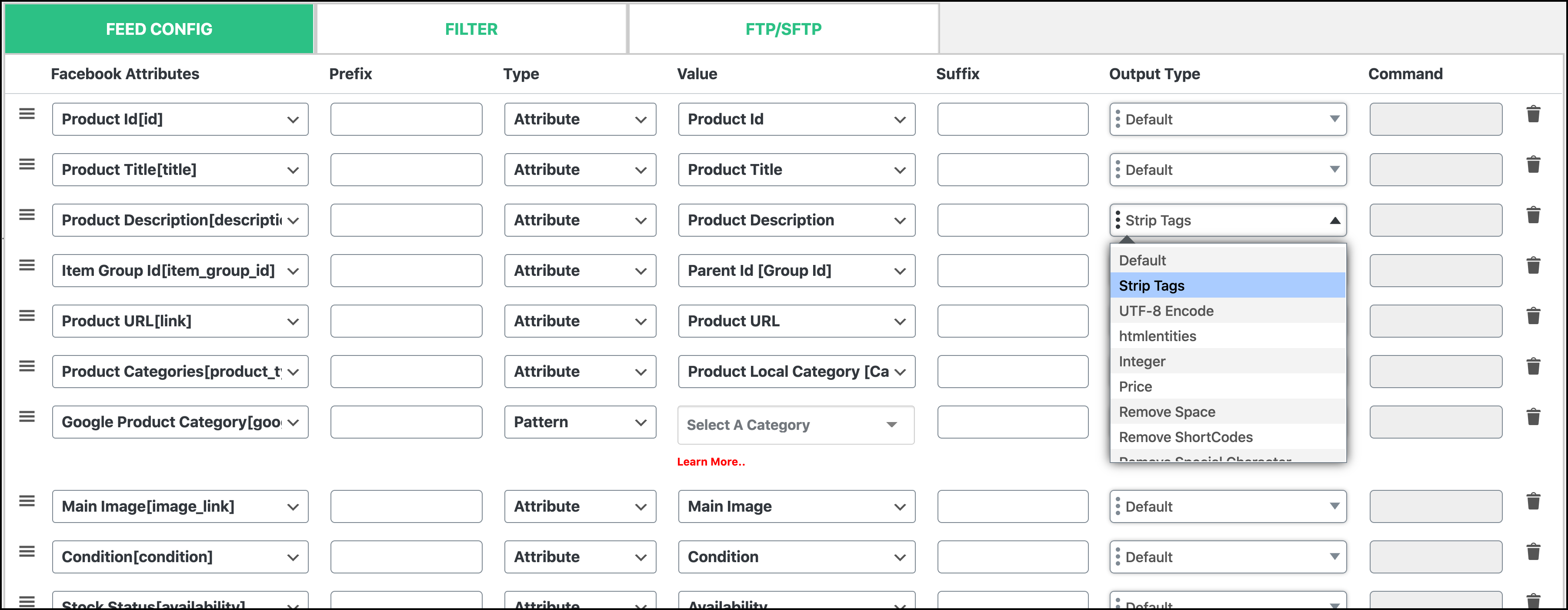
Output Types 
Category Mapping
Installation
Before installing the plugin please make sure that
- Your php version is 5.4 or greater
- WordPress version is 3.6 or greater
- WooCommerce version is 2.4 or greater
You can also check your system status and versions from WooCommerce > System Status
This section describes how to install the plugin and get it working.
e.g.
- Upload
webappick-product-feed-for-woocommercefolder to the/wp-content/plugins/directory - Activate the plugin through the ‘Plugins’ menu in WordPress
- Select ‘CTX Feed’ from admin menu, Click ‘Make Feed’
- Select the template and make feed
- Done!
FAQ
Read Documentation and FAQ
For Support Email to support@webappick.com
-
Why should I use this WooCommerce product feed plugin?
-
This plugin support all the sopping engines.
-
Why is CTX Feed one of the best WooCommerce product feed generators?
-
Being a freemium plugin, the free version is capable of generating a feed with almost every little element you need to make it perfect. However, the pro version can leverage your feed with lots of premium features like dynamic attribute (applying conditions on the products), attribute mapping (for modifying title, description, or other attributes), ample marketplaces to promote your products, custom template for more complex feed for a personalized channel, variations and variables setup, multilingual & multicurrency feature, different output types for mapping the products, auto-update feature, etc. These features make it one of the best WooCommerce product feed plugins.
-
For which channels can I generate product feed with CTX Feed free and pro version?
-
Tou can create a feed for more than 100 marketing channels from high-range to any range. It is available for both free and pro versions. However, the pro version of this WooCommerce product feed manager allows you to create custom templates for your own bespoke channels.
-
Can I generate a Google product feed for WooCommerce with CTX Feed?
-
Yes, you can. In fact, WooCommerce Google Shopping is one of the most key channels for feed generation. Therefore, we have not only put Google Shopping as a single channel, but we also have several templates of Google built-in the CTX Feed, such as Google Shopping inventory ads, Google Ads, Google Promotions, Google Dynamic search ads, etc.
-
How do I generate a WooCommerce Google product feed for Google Shopping?
-
Check out the following tutorial.
WooCommerce Google Shopping Product Feed – Video Tutorial
-
How can I create Facebook product catalog feeds?
-
Watch the following YouTube video to know more about creating the Facebook catalog feed
WooCommerce Facebook Catalog Product Feed – Video Tutorial
-
Are there any limits of products the plugin supports in a single feed?
-
No. You can create a feed with unlimited products.
-
Are there any limits on product feed?
-
No. This best WooCommerce product feed plugin is capable of creating an unlimited number of feeds.
-
Does CTX Feed auto-update product feeds?
-
Yes, This plugin offers you a range of product feed updating interval times. You can set your interval time, and the product feed will update automatically as per the scheduled time.
-
What file format does CTX Feed Plugin Support?
-
It supports 6 feed file formats depending on the marketing channels you select;
- XML
- CSV
- TXT
- TSV
- JSON
- XLS
-
Does this plugin support. product variations?
-
Yes, This plugin supports both variables and their associated variations.
-
What is the difference between Free and Pro Version?
-
The free version includes all the major functions but the Pro version has some awesome functionality.
Using pro version:
-
You can filter products using price, quantity, product name
-
You can use custom taxonomies or other plugins taxonomy value into feed
-
Using Category Mapping You can map your store category with your merchant category which is very useful for visitors to find out your product on the merchant site.
-
You can make different prices for different merchants using Dynamic Attribute. Also, it is possible to set different values for different products using Dynamic Attribute Conditions.
** CTX FEED Free vs Pro**
-
Reviews


Contributors & Developers
“CTX Feed – WooCommerce Product Feed Manager Plugin” is open source software. The following people have contributed to this plugin.
Contributors


Translate “CTX Feed – WooCommerce Product Feed Manager Plugin” into your language.
Interested in development?
Browse the code, check out the SVN repository, or subscribe to the development log by RSS.
Changelog
6.4.23 (2024-04-16)
- Tweak: WooCommerce 8.7.0 compatibility checked.
6.4.22 (2024-04-03)
- Tweak: WordPress 6.5 compatibility checked.
6.4.21 (2024-04-01)
- Fixed: Drafted variations, not excluding issue
6.4.20 (2024-03-28)
- Updated: Code Refactor
6.4.19 (2024-03-25)
- Fixed: Plugin translate issue
6.4.18 (2024-03-18)
- Fixed: Private variable product variations include issue
6.4.17 (2024-03-14)
- Fixed: Parent empty issue
6.4.16 (2024-03-11)
- Fixed: Custom Fields value issue for variations product
6.4.15 (2024-03-07)
- Fixed: Status page PHP warning issue
6.4.14 (2024-03-04)
- Fixed: Shipping price issue
6.4.13 (2024-02-29)
- Tweak: WooCommerce 8.6.1 compatibility checked.
6.4.12 (2024-02-22)
- Fixed: Zbozi.cz template wrapper issue
6.4.11 (2024-02-19)
- Updated: Update Interval text
6.4.10 (2024-02-15)
- Updated: Snapchat template
6.4.9 (2024-02-12)
- Updated: Manage Feeds page text
6.4.8 (2024-02-06)
- Fixed: Price issue with tax
6.4.7 (2024-02-02)
- Updated: Code refactor
6.4.6 (2024-01-25)
- Fixed: Parent Category and Child Category Attribute issue
- Fixed: WooCommerce Dynamic Pricing With Discount Rules price issue
- Fixed: Image missing issue
- Updated: Code refactor
6.4.5 (2024-01-22)
- Fixed: Variation Product Title issue
- Fixed: Feature image issue
6.4.4 (2024-01-22)
- Fixed: Image URL Conversion issue
- Fixed: Category and Full Category hierarchy issue
- Fixed: Product Title comma issue
6.4.3 (2024-01-18)
- Fixed: Parent Product null issue
6.4.2 (2024-01-17)
- Fixed: Product title with attribute value issue
- Fixed: Special characters removing title from feed issue
- Fixed: Additional image link missing issue
- Fixed: Variation title in feed issue
- Fixed: Quantity attribute quantity missing from variation issue
- Fixed: Price issue with Flycart Discount Rule Plugin
- Fixed: 0 used as an attribute value issue
- Fixed: Category hierarchy issue
- Fixed: String replace row delete issue
- Fixed: Quantity value issue
6.4.1 (2024-01-11)
- Fixed: Separators overriding issue
- Fixed: Language switcher loading issue
- Fixed: Google product review template issue
- Fixed: Shipping format issue
6.4.0 (2024-01-08)
- Fixed: CTX Feed Compatibility issue
- Updated: Code Refactor
- Removed: Christmas Notice Banner
6.3.12 (2024-01-01)
- Fixed: URL conversion issue.
6.3.11 (2023-12-27)
- Updated: Readme Content.
6.3.10 (2023-12-21)
- Fixed: FTP server connecting issue
6.3.9 (2023-12-18)
- Added: Christmas Notice Banner
- Added: xlsx format for Walmart
- Remove: Product Feed tab from Customer Role dashboard
- Fixed: Feed creation issue with WPML
- Fixed: Minor code base error
6.3.8 (2023-12-11)
- Fixed: Category mapping’s site language issue
- Fixed: Group product not including issue
- Fixed: Feed size issue
- Fixed: Minor code base error
6.3.7 (2023-12-05)
- Removed: Black Friday Notice Banner
6.3.6 (2023-12-04)
- Fixed: PHP error on Query Monitor
- Fixed: Heureka wrapper SHOPITEM instead of Product
- Fixed: Compatibility issue with WooCommerce Multilingual & Multicurrency by OnThegoSystems
- Fixed: Group product not including issue
- Fixed: UI breaking in RTL
- Fixed: Category mapping page categories are not appear with the site language issue
6.3.5 (2023-11-30)
- Updated: Code refactor
6.3.4 (2023-11-27)
- Fixed: Bing shopping template issue Shipping Attribute
- Fixed: Additional image URL issue in Skroutz.gr template
- Fixed: Make Feed page blank issue
- Fixed: WooCommerce Dynamic Pricing & Discount by RightPress Plugin error on feed generation
- Fixed: FTP upload issue
6.3.3 (2023-11-22)
- Added: Checkout link attribute to Google shipping template
- Fixed: Unpredictable feed size and auto-update button enabled automatically.
- Updated: Attribute and Template Title text
6.3.2 (2023-11-15)
- Updated: Code refactor
6.3.1 (2023-11-15)
- Added: Black Friday Notice Banner
6.3.0 (2023-11-13)
- Added: New UI/UX feature for the Doc Page
- Fixed: Auto update button enable on regenerate feed
- Updated: Code refactor
6.2.6 (2023-11-09)
- Added: Capacity attribute to Google feed attribute list
- Added: Compatibility issue with multivendorx
- Added: Primary Category Option in Primary Attribute for Yoast SEO Plugin
- Fixed: Attribute Mapping Page loading issue
- Tweak: WordPress 6.4 compatibility checked
6.2.5 (2023-11-06)
- Fixed: Compatibility issue With Discount Rules Pro By Acowebs plugin.
- Added: New attribute “pause” for google template
- Added: New attribute [auto_pricing_min_price] to google template
- Updated: Show Notification after the process of clear cache button on Status page.
- Tweak: WooCommerce 8.2.1 compatibility checked.
6.2.4 (2023-11-02)
- Fixed: RightPress Plugin Compatibility issue
- Removed: Halloween Notice Banner
6.2.3 (2023-10-31)
- Added: Certification [certification] attribute in Google Shopping
6.2.2 (2023-10-26)
- Updated: Right side banner UI
6.2.1 (2023-10-24)
- Fixed: File Type default XML selected issue
6.2.0 (2023-10-24)
- Added: New UI/UX feature for Status Page
- Updated: Halloween Notice Banner
6.1.6 (2023-10-20)
- Added: Halloween Notice Banner
- Updated: Code Refactoring
6.1.5 (2023-10-19)
- Tweak: WordPress 6.3.2 compatibility checked
- Updated: lifestyle_image_link attribute included on Google Shopping Template
- Fixed: Redis cache on server for CTX feed
6.1.4 (2023-10-16)
- Fixed: File upload issue to server via FTP
- Fixed: Conflict with JWT Auth issue
- Fixed: Dynamic Shipping Unit issue
6.1.3 (2023-10-12)
- Fixed: Woo Discount Rules by Flycart plugin issue
- Fixed: _sale_price suffix removal issue
- Fixed: Clear cache button issue on Notice
6.1.2 (2023-10-09)
- Fixed: The prefix and suffix issue for numeric value.
- Fixed: Price SUFFIX editable issue
- Fixed: Identifier_exits issue for Taxonomy Brand
6.1.1 (2023-10-04)
- Fixed: WP-CLI issue
- Fixed: Rank Match SEO Title issue
- Fixed: Typography issue
- Fixed: Identifier_exits issue for Dynamic Brand attribute
6.1.0 (2023-10-02)
- Added: Make Feed Page New UI/UX feature.
- Updated: Manage Feed Page UI/UX feature.
- Updated: PHP 8 compatibility
6.0.9 (2023-09-26)
- Updated: UX/UI Enhancement
6.0.8 (2023-09-20)
- Updated: Status Page UX
6.0.7 (2023-09-14)
- Updated: UX/UI Enhancement
6.0.6 (2023-09-12)
- Tweak: WooCommerce 8.0.3 compatibility checked.
6.0.5 (2023-09-07)
- Tweak: WordPress 6.3.1 compatibility checked.
6.0.4 (2023-09-04)
- Updated: UX/UI Enhancement
6.0.3 (2023-08-28)
- Updated: UX/UI Enhancement
6.0.2 (2023-08-18)
- Fixed: UI/UX Update
6.0.1 (2023-08-17)
- Fixed: Bug fix.
6.0.0 (2023-08-17)
- Added: New UI/UX feature for Make Feed Page.
- Updated: Update UI/UX for Manage Feed Page.
5.4.35 (2023-08-16)
- Tweak: WordPress 6.3 compatibility checked.
5.4.34 (2023-08-07)
- Updated: Right Side Banner UI Update
5.4.33 (2023-07-31)
- Updated: UX/UI Enhancement
5.4.32 (2023-07-24)
- Updated: Docs page UI Enhancement
5.4.31 (2023-07-20)
- Updated: UX/UI Enhancement
5.4.30 (2023-07-17)
- Fixed: WP Options data loading issue
5.4.29 (2023-07-13)
- Fixed: Full Category issue
5.4.28 (2023-07-10)
- Fixed: Missing Field and Incorrect Order for Custom Template 1
5.4.27 (2023-07-06)
- Fixed: Category mapping special character issue
5.4.26 (2023-07-03)
- Updated: UX/UI Enhancement
5.4.25 (2023-06-26)
- Updated: Merchant documentation link
5.4.24 (2023-06-24)
- Updated: UX/UI Enhancement
5.4.23 (2023-06-21)
- Fixed: Sale price getting removed after auto update
5.4.22 (2023-06-19)
- Fixed: Compatibility issue with Conditional Discounts for WooCommerce
5.4.21 (2023-06-15)
- Fixed: Child Category Title issue
5.4.20 (2023-06-12)
- Updated: UX/UI Enhancement
5.4.19 (2023-06-08)
- Fixed: Child Category rendering issue
5.4.18 (2023-06-07)
- Updated: Code Refactoring
5.4.17 (2023-06-05)
- Fixed: Price Filter Hook issue.
5.4.16 (2023-06-01)
- Updated: UX/UI Enhancement
5.4.15 (2023-05-31)
- Fixed: Access Issue for Shop Manager Role
5.4.14 (2023-05-29)
- Updated: UX/UI Enhancement
5.4.13 (2023-05-24)
- Fixed: Review Banner Button issue
5.4.12 (2023-05-22)
- Fixed: Order Received page blank issue.
5.4.11 (2023-05-17)
- Tweak: WooCommerce 7.7 compatibility checked.
- Updated: Notice and Title Text
5.4.10 (2023-05-15)
- Updated: Button UI/UX
5.4.9 (2023-05-11)
- Fixed: Manage Feed Page Bug fix
5.4.8 (2023-05-10)
- Fixed: Compatibility issue with Conditional Discounts for WooCommerce
5.4.7 (2023-05-08)
- Fixed: Compatibility issue with Pricing Deals for WooCommerce by Vark
- Updated: Compatibility issue with Discount Rules for WooCommerce By Acowebs plugin
5.4.6 (2023-05-04)
- Fixed: Compatibility issue with Discount Rules for WooCommerce By Acowebs plugin
5.4.5 (2023-05-02)
- Updated: Setting Page UI/UX
5.4.4 (2023-04-26)
- Updated: Manage Feeds UI/UX
5.4.3 (2023-04-19)
- Fixed: Category Mapping edit issue
5.4.2 (2023-04-17)
- Updated: Sweet alert notification.
5.4.1 (2023-04-12)
- Added: Dashboard Banner.
- Added: Blog Right Sidebar.
5.4.0 (2023-04-10)
- Added: New UI/UX feature for Manage Feeds Page
5.3.5 (2023-04-06)
- Fixed: Minor bug fixing.
5.3.4 (2023-04-04)
- Tweak: WordPress 6.2 compatibility checked.
- Fixed: Minor bug fixing.
5.3.3 (2023-03-27)
- Fixed: Category mapping issue.
- Fixed: Minor bug fixing.
5.3.2 (2023-03-22)
- Fixed: Unit Price Measure attribute does not get the value.
- Fixed: BestPrice template update.
5.3.1 (2023-03-15)
- Fixed: Minor issue fixed.
5.3.0 (2023-03-13)
- Added: New UI/UX feature for Settings.
- Added: Notice to clear cache after newly added WPOptions.
- Fixed: Yoast SEO GTIN field value is not getting pulled to the feed for variation item.
5.2.1 (2023-03-07)
- Added: Notice to clear cache after newly added category mapping.
- Fixed: Minor issue fixed.
5.2.0 (2023-02-27)
- Added: New UI/UX feature for Category Mapping.
- Added: HPOS compatibility.
5.1.0 (2023-02-22)
- Added: New UI/UX feature for Dynamic Attributes.
- Added: New UI/UX feature for Attributes Mapping.
5.0.1 (2023-02-15)
- Added: Set the cache clear button on the notification
- Fixed: Minor issue fixed.
5.0.0 (2023-02-09)
- Added: New UI/UX feature for WP Options
- Fixed: Notice to clear cache after making a new product attributes field issue
4.7.3 (2023-02-06)
- Fixed: WP-Bakery builder header shortcode remove
- Removed: Notice for Products publish more than 50K
4.7.2 (2023-01-30)
- Added: Notice for Products publish more than 50K
4.7.1 (2023-01-23)
- Fixed: Minor issue fixed.
4.7.0 (2023-01-23)
- Added: Notice to clear cache after making a new product attributes field
4.6.1 (2023-01-17)
- Removed: Christmas Notice Banner
- Fixed: Minor code base errors
4.6.0 (2023-01-05)
- Added: .xlsx file type for Bol.com feed format template
4.5.16 (2022-12-27)
- Fixed: CPC field is not removing
4.5.15 (2022-12-20)
- Added: Christmas Notice Banner Added
4.5.14 (2022-12-15)
- Fixed: Enable using the same attribute multiple times in Custom template 1.
4.5.13 (2022-12-07)
- Fixed: Facebook and google template UTF-8 encode error
4.5.12 (2022-12-06)
- Added: Black Friday Notice Banner Remove
- Fixed: Yandex xml format feed generation stuck
4.5.11 (2022-11-21)
- Added: Black Friday Notice Banner Added
4.5.10 (2022-11-14)
- Fixed: Skroutz template additional image attribute tag
- Added: Skroutz template multiple additional image attribute tag
4.5.9 (2022-11-08)
- Fixed: PHP Warning: Uninitialized string offset.
4.5.8 (2022-11-07)
- Fixed: Undefined array key “page” Warning fixed.
4.5.7 (2022-10-28)
- Added: Featured Status attribute added.
- Tweak: WordPress 6.1 compatibility checked.
4.5.6 (2022-10-26)
- Fixed: Snapchat image attribute changes from image to image_link.
- Fixed: Halloween discount banner only shows into plugin pages.
4.5.5 (2022-10-17)
- Added: Product Status attribute added.
4.5.4 (2022-10-12)
- Fixed: Minor issues fixed.
4.5.3 (2022-09-22)
- Fixed: Both Product Query Type issue fixed.
- Fixed: Minor bug fixing to config class.
4.5.2 (2022-09-15)
- Fixed: Both Product Query Type class missing.
- Fixed: Pinterest RSS Board Feed changed from atom to RSS version 2.0.
- Fixed: Feed Import & Export issue fixed.
- Added: Download file module added.
4.5.1 (2022-08-24)
- autoload file not found issue fixed.
4.5.0 (2022-08-24)
- Product query feature improved.
4.4.69 (2022-07-19)
- Fixed: Fatal error issue solved when WooCommerce is not active
4.4.68 (2022-06-29)
- Fixed: Feed import issue solved
- Fixed: Feed template loading issue solved
- Fixed: Google Review feed issue fixed
- Fixed: Facebook variable product remove
- Fixed: String case convert issue fixed
- Fixed: Refactoring Product attributes dropdown
4.4.67 (2022-06-10)
- Fixed: Wanted a one star review.
- Fixed: WPML Notice dismiss button not working.
4.4.66 (2022-06-07)
- Added: Securing, Fixing Some input-output P4
4.4.65 (2022-06-01)
- Added: Securing, Fixing Some input-output P3
4.4.64 (2022-05-30)
- Added: Securing, Fixing Some input-output P2
4.4.63 (2022-05-26)
- Added: added filter to secure input-output P1
4.4.62 (2022-05-25)
- Fixed: Fixing autoload, SuperGlobal, and external links
4.4.61 (2022-05-23)
- Updated: Updated readme content.
- Fixed: Idealo feed generation stuck
- Fixed: JS build version
4.4.60 (2022-05-10)
- Updated: Updated readme content.
- Tested: Tested upto wp 5.9.3.
4.4.59 (2022-04-26)
- Updated: Idealo ImageURLs attribute value updated to semicolon seperated.
4.4.58 (2022-04-21)
- Fixed: During auto update Google Review Feed structure is changed – issue has been fixed.
4.4.57 (2022-04-11)
- Fixed: During Quick Edit, custom identifiers fields value become empty – issue has been fixed.
4.4.56 (2022-03-29)
- Fixed: Call to a member function get_price() on bool – issue has been fixed.
4.4.55 (2022-03-22)
- Updated: Google Promotional Feed attributes updated.
- Fixed: XLS file not generating for custom template 1 – issue has been solved.
- Fixed: Filter for shipping cost for the shipping attribute.
4.4.54 (2022-03-15)
- Added: Custom Fields Post Meta support.
- Added: WooCommerce Advanced Shipping plugin by Sormano compatibility has been added.
- Fixed: Feed gets only the first shipping region coming from multi-region for specific country – issue has been fixed.
- Fixed: New Attribute row have command enable, should be readonly – issue has been fixed.
- Fixed: PHP 8 – Fatal error array_reverse() must be of type array, bool given – issue has been fixed.
- Fixed: Thousands separator not working for Google Merchant – issue has been fixed.
4.4.53 (2022-03-08)
- Updated: Content IDs argument updated for Facebook Pixel.
- Fixed: Schema prices has been fixed according to product attribute variant products.
4.4.52 (2022-03-01)
- Fixed: Decimal and Thousand seperator does not work – issue has been fixed.
- Fixed: Category mapping not saving for facebook – issue has been fixed.
- Updated: Readme documentation updated.
4.4.51 (2022-02-24)
- Updated: Pinterest catalog feed attributes updated.
4.4.50 (2022-02-16)
- Fixed: Review feed not generating when the special character in review title or description – issue has been fixed.
4.4.49 (2022-02-08)
- Fixed: Review reply comes as a review for Google Review Template – issue has been fixed.
- Updated: Learn more button’s link in feed configuration setting has been updated.
4.4.48 (2022-01-31)
- Updated: Idealo template attributes and link updated.
4.4.47 (2022-01-24)
- Added: WordPress 5.9 compatibility test and version dump.
4.4.46 (2022-01-21)
- Fixed: Facebook language override & Facebook inventory attribute missing – issue has been solved.
- Tweak: Added filter to the title attribute to remove attributes after the title for variation products.
4.4.45 (2022-01-12)
- Added: Quantity and Price attributes added for skroutz.gr template.
- Fixed: Category mapping not saving for google attributes first time – issue has been solved.
- Fixed: Unwanted command in bol.com template – issue has been solved.
4.4.44 (2022-01-04)
- Fixed: Facebook pixel ‘add shopping cart’ should not trigger when not set – issue has been solved.
- Fixed: Aramex shipping plugin button disabled – issue has been solved.
4.4.43 (2021-12-19)
- Added: Woocommerce 6.0.0 version compatability added.
- Fixed: Availability date attribute missing in custom fields group – issue has been fixed.
- Fixed: Prevent unnecessary aramex shipping plugin files from loading.
4.4.42 (2021-12-13)
- Fixed: New added attribute does not work after dragging to new position – issue has been fixed.
- Fixed: Woocommerce override schema data issue fixed.
4.4.41 (2021-12-06)
- Added: Miinto.de template updated.
- Fixed: Banner collapsed when woocommerce is not installed – issue has been fixed.
- Fixed: Attributes min_handling_time and max_handling_time does not output attribute value – issue has been fixed.
- Fixed: Undefined array_column for product type error – issue has been fixed.
4.4.40 (2021-12-01)
- Updated: Heureka.sk template updated.
4.4.39 (2021-11-26)
- Updated: Facebook new attribute added.
- Added: Currency attribute has been added.
- Fixed: Price suffix changing issue has been solved.
4.4.38 (2021-11-19)
- Fixed: Loyalty point attribute for Google shopping template not working issue fixed.
- Fixed: Product sale price override in schema issue fixed.
- Fixed: Conflict with woo discount plugin and sale price attribute issue fixed.
4.4.37 (2021-11-16)
- Fixed: Currency/Unit postfix customization issue fix.
4.4.36 (2021-11-10)
- Fixed: Item Wrapper and Single Item Wrapper fields should be hide when the template is not custom template.
4.4.35 (2021-11-09)
- Fixed: Variable product missing issue fixed.
- Tweak: WooCommerce 5.9.0 compatability tested.
4.4.34 (2021-11-02)
- Added: Google Remarketing Tag tracking support added.
- Added: Quantity sell attribute added for facebook.
- Fixed: Product category sequence issue fixed.
- Fixed: Skroutz.gr availability string issue fixed.
- Fixed: Tab display conflict with 3rd party plugin issue fixed.
- Fixed: Group product price issue fixed.
4.4.33 (2021-10-22)
- Fixed: Unit & Currency postfix issue.
4.4.32 (2021-10-21)
- Added: Unit & Currency auto postfix added.
- Fixed: Design issue fixed.
- Fixed: Automated output type select issue fixed.
- Modified: Category full path output type modified.
4.4.31 (2021-10-19)
- Added: TikTok catalogue added.
- Fixed: Facebook Pixel quotation escaping issue fixed.
- Fixed: WordPress backward compatability issue fixed.
4.4.30 (2021-10-15)
- Added: WoodMart WooCommerce theme variation gallery image compatability added.
- Fixed: Review request popup issue fixed.
- Fixed: Remove space output type issue fixed.
4.4.29 (2021-10-11)
- Fixed: Windows server file path issue fixed.
4.4.28 (2021-10-08)
- Fixed: WOOCS plugin compatability issue fix.
- Fixed: Challan conflict issue fixed.
4.4.27 (2021-10-04)
- Fixed: Facebook pixel event issue fixed.
- Fixed: Translate press url slug issue fixed.
4.4.26 (2021-09-24)
- Fixed: UI issue fixed.
- Fixed: Google category mapping issue fixed.
4.4.25 (2021-09-17)
- Fixed: CTX Custom Field backward compatability issue fixed.
4.4.24 (2021-09-15)
- Fixed: UTF-8 character encoding issue fixed.
4.4.23 (2021-09-09)
- Added: Google Merchant new attributes added to Google Shopping template ( product_weight, product_height, product_length, product_weight, ships_from_country ).
- Improved: Product Title attribute and availability attribute updated according to Google Shopping template.
- Improved: Shortcodes from product description will be automatically removed.
- Improved: WooCommerce default schema override settings set to off by default.
- Improved: Product Variations missing for Individual variations query issue fixed.
- Fixed: Divi Builder shortcode not removing issue fixed.
4.4.22 (2021-09-02)
- Fixed: Title limit added for google, facebook, pinterest, bing template.
- Fixed: Description limit added for google, facebook, pinterest, bing template.
4.4.21 (2021-08-29)
- Added: Support for ecommerce.it added.
- Added: New file type(JSON) added.
- Added: Availability date custom field control added on settings page.
- Fixed: Settings page UI improved.
- Fixed: Google category mapping UI improved.
4.4.20 (2021-08-17)
- Added: Category Mapping performance improved.
- Added: Button design improved.
- Added: Feed duplication feature added.
- Fixed: Ultimate Member plugin compatibility issue fixed.
- Fixed: Parent/Child category issue fixed.
- Fixed: Google category mapping for existing user.
4.4.19 (2021-08-06)
- Fixed: License key activation issue.
- Fixed: Auto generate attribute key.
4.4.18 (2021-08-05)
- Added: UTM parameter added for external product link.
- Added: Automatic category suggestion for Google, Facebook, Pinterest, Bing, Snapchat.
- Added: Automatic copy category added.
- Fixed: Extra shortcode string removed.
- Fixed: Conflict with Ultimate Member plugin resolved.
- Fixed: Settings page switch not working issue resolved.
4.4.17 (2021-08-03)
- Added: Google Merchant SFTP/FTP upload compatability added.
- Added: Feed log download option from manage feed page.
- Fixed: Status page undefined index error solved.
- Fixed: SFTP error fixed.
4.4.16 (2021-07-30)
- Added: Availability date custom field for product variation.
- Added: Supports custom stock status(availability). But custom stock status will return in stock for Google, Facebook, Pinterest & Bing.
- Fixed: Variation image validation added.
- Fixed: Feed generation stuck issue for orphaned woocommerce variation fixed.
4.4.15 (2021-07-28)
- Added: WordPress 5.8 version compatibility tested.
- Fixed: Bundled product compatibility issues fixed.
- Fixed: Composite product compatibility issues fixed.
4.4.14 (2021-07-16)
- Fixed: Custom Attributes not adding to variation title issue fixed.
- Fixed: Shipping settings label updated.
- Fixed: Brand taxonomies not available inot product attribute list issue fixed.
4.4.13 (2021-07-12)
- Added: Availability date attribute has been added.
- Added: Woocommerce Germanized gtin,mpn attribute has been added.
- Fixed: Variable product missing issue has been fixed.
4.4.12 (2021-07-05)
- Fixed: Google empty Category issue fixed.
4.4.11 (2021-07-02)
- Added: Shipping handling time and transit time attributes added.
- Fixed: Variations can’t be dragged separately issue has been fixed.
4.4.10 (2021-07-01)
- Fixed: Gtin identifiers with attribute addition.
4.4.9 (2021-06-30)
- Fixed: Gtin missing issue has been fixed.
- Fixed: Availability attribute value should return 0 when out of stock product quantity is empty.
4.4.8 (2021-06-29)
- Fixed: Google Shipping attribute not adding to CSV Feed has been solved.
4.4.7 (2021-06-28)
- Fixed: Extra identifier image attribute removed, additional image attribute should be used instead.
4.4.6 (2021-06-24)
- Added: Rank math GTIN attribute has been added.
4.4.5 (2021-06-23)
- Added: Log file download feature has been added.
4.4.4 (2021-06-22)
- Added: Yoast identifier attributes has been added.
- Added: Yoast WooCommerce SEO plugin compatibility added.
4.4.3 (2021-06-21)
- Fixed: Minor warning fixed.
- Fixed: Latest video tutorial link at readme.
4.4.2 (2021-06-20)
- Fixed: Shipping cost empty instead of 0 for free shipping, issue has been fixed.
- Fixed: Warning about get_class object has been fixed.
4.4.1 (2021-06-17)
- Fixed: Code enhancement and junk cleaned.
- Fixed: Performance improved.
4.4.0 (2021-06-16)
- Added: Google installment attributes added.
- Added: Unit price attributes added.
4.3.101 (2021-06-16)
- Tweak: Added filter for schema description.
- Fixed: Upgrade compatibility for identifier issue fixed.
4.3.100 (2021-06-14)
- Fixed: Condition attribute default value missing for Google and Facebook template has been fixed.
- Fixed: Variation input broken design fixed.
- Fixed: Variation meta issue for identifier fixed.
4.3.99 (2021-06-13)
- Fixed: Identifier values missing issue fixed.
4.3.98 (2021-06-10)
- Fixed: Identifier for variation not working issue fixed.
4.3.97 (2021-06-10)
- Fixed: Identifier attributes missing in the dropdown issue fixed.
4.3.96 (2021-06-09)
- Fixed: Vendor store name attribute.
4.3.95 (2021-06-09)
- Fixed: Brand value as wp error issue has been fixed.
4.3.94 (2021-06-08)
- Added: Custom fields settings has been added to setting page.
4.3.93 (2021-06-07)
- Fixed: Code Enhancement.
- Fixed: Junk Cleaned.
4.3.92 (2021-06-03)
- Fixed: Facebook description issue for description attribute has been fixed.
4.3.91 (2021-06-02)
- Fixed: Review template not getting all the reviews issue has been fixed.
4.3.90 (2021-05-31)
- Fixed: Facebook description issue for description html attribute fixed.
4.3.89 (2021-05-27)
- Fixed: Set woocommerce default country to new feed.
4.3.88 (2021-05-26)
- Fixed: Brand taxonomy issue for quick edit fixed.
4.3.87 (2021-05-23)
- Added: Filter hook added for auto update interval.
4.3.86 (2021-05-20)
- Fixed: Google webitemid attribute output as g:webitemid.
4.3.85 (2021-05-19)
- Added: Attribute field webitemid to google merchant.
4.3.84 (2021-05-13)
- Fixed: Removed junk banner message.
4.3.83 (2021-05-12)
- Added: Language URL slug for Translatepress plugin.
4.3.82 (2021-05-10)
- Fixed: Status tab active issue fixed.
4.3.81 (2021-05-07)
- Added: New attribute Product Description (with HTML) added. This attribute will return product description with HTML tags.
4.3.80 (2021-05-06)
- Added: GoedGeplaatst.nl template default attributes added.
4.3.79 (2021-05-04)
- Added: GoedGeplaatst.nl template has been added.
4.3.78 (2021-05-03)
- Fixed: Global p tag style removed.
4.3.77 (2021-04-29)
- Fixed: Yoast canonical link issue has been fixed.
4.3.76 (2021-04-27)
- Fixed: Output Type auto select issue fixed.
4.3.75 (2021-04-27)
- Fixed: Junk cleaned.
- Fixed: Performance enhancement.
4.3.74 (2021-04-25)
- Fixed: Output type auto select issue fixed.
4.3.73 (2021-04-23)
- Fixed: Google shipping price issue fixed.
4.3.72 (2021-04-22)
- Fixed: Output type updated, removed date format.
4.3.71 (2021-04-20)
- Fixed: Google prefix was missing for shipping sub attributes, issue has been fixed.
4.3.70 (2021-04-20)
- Fixed: Custom template adding CDATA issue has been fixed.
4.3.69 (2021-04-18)
- Fixed: CDATA issue has been fixed.
- Fixed: FTP setting description updated.
4.3.68 (2021-04-15)
- Fixed: WP_POST as string fatal error has been solved.
4.3.67 (2021-04-14)
- Added: FTP enable/disable option has been added.
4.3.66 (2021-04-13)
- Fixed: Brand by ctx feed missing in the dropdown issue has been fixed.
4.3.65 (2021-04-12)
- Fixed: Improved performance.
- Fixed: Code enhancement and Junk cleaned.
4.3.64 (2021-04-11)
- Fixed: Free shipping contains price issue has been solved.
4.3.63 (2021-04-08)
- Added: Ratings in the review template has been added.
4.3.62 (2021-04-07)
- Fixed: Performance Enhancement.
- Fixed: Junk Cleaned.
4.3.61 (2021-04-06)
- Added: Google product review template has been added – (beta test).
- Fixed: PHP Warning: min() lowest shipping price issue fixed.
4.3.60 (2021-04-04)
- Added: Compatibility for Pricing Deals for WooCommerce by Vark.
4.3.59 (2021-04-02)
- Tweak: Custom Template without cdata and XML UTF-8 encoding for XML element string.
4.3.58 (2021-04-01)
- Fixed: Conflict with XT WooCommerce Variation Swatches plugin has been solved.
4.3.57 (2021-03-31)
- Fixed: TAB delimiter missing issue solved.
- Fixed: FeedType change make wrong delimiter selected issue has been solved.
4.3.56 (2021-03-29)
- Added: Compatibility for Discount Plugin by Orion has been added.
4.3.55 (2021-03-28)
- Added: Addtocart in cart & product page added and removed ajax addtocart event.
4.3.54 (2021-03-25)
- Added: Compatibility for Dynamic Pricing With Discount Rules by Acowebs.
- Fixed: Pattern label updated.
4.3.53 (2021-03-24)
- Added: Custom fields feature, custom fields should be found in the dropdown list.
- Added: Taxonomies feature, taxonomies should be found in the dropdown list.
4.3.52 (2021-03-22)
- Added: Compatibility for Discount Rules for WooCommerce by Flycart.
4.3.51 (2021-03-18)
- Fixed: Onchange feedType to csv and txt, delimiter and enclosure doesn’t show is solved.
4.3.50 (2021-03-17)
- Tweak: WordPress 5.7 compatibility tested.
- Fixed: Bundled product not appearing issue solved.
- Fixed: Undefined current_price issue solved.
4.3.49 (2021-03-16)
- Added: Compatibility for WooCommerce Bundled Products by Iconic.
4.3.48 (2021-03-15)
- Fixed: PHP 7.4+ compatibility tested.
- Fixed: Temporary codes removed.
4.3.47 (2021-03-14)
- Added: Product full category path attribute added.
- Fixed: Product local category label updated to product category.
4.3.46 (2021-03-11)
- Fixed: Facebook pixel issue solved.
4.3.45 (2021-03-10)
- Fixed: Modify modalova template attributes.
4.3.44 (2021-03-09)
- Added: Modalova template added.
4.3.43 (2021-03-08)
- Tweak: Enhancement performance.
- Fixed: Cleaned junk files.
4.3.42 (2021-03-07)
- Fixed: Undefined index feed_country issue has been solved.
4.3.41 (2021-03-03)
- Tweak: Tested WordPress 5.7 compatibility.
4.3.40 (2021-03-03)
- Tweak: WC_Query as default product feed query.
- Fixed: Feed attribute change issue fixed.
4.3.39 (2021-03-02)
- Added: Added filter for all product attributes.
4.3.38 (2021-02-28)
- Tweak: Rakuten.de template updated.
4.3.37 (2021-02-25)
- Fixed: Status page product count issue fixed.
4.3.36 (2021-02-24)
- Added: Additional images in google and facebook default attributes list has been added.
4.3.35 (2021-02-22)
- Added: Click button to copy status in status page has been added.
4.3.34 (2021-02-18)
- Added: Wine Searcher template added.
4.3.33 (2021-02-17)
- Added: WP options feature added where wordpress built-in options can be set from the WP Options page and can be found in the product attribute dropdown list.
- Added: Product custom attributes in product attribute dropdown list.
4.3.32 (2021-02-16)
- Added: Auto exclude url addition for caching plugins.
4.3.31 (2021-02-14)
- Added: Woo Feed to new name CTX Feed.
- Added: Status page new look with all product counter.
4.3.30 (2021-02-11)
- Added: WooCommerce latest version(5.0.0) compatibility.
- Tweak: Updated doc links.
- Tweak: Updated topbar links.
4.3.29 (2021-02-10)
- Added: Open feed file button in edit feed page.
4.3.28 (2021-02-07)
- Fixed: GTIN/MPN/EAN disabled hide inputs at edit product page.
4.3.27 (2021-02-03)
- Fixed: Input request issues fixed.
4.3.26 (2021-02-03)
- Added: WooCommerce latest version(4.9) compatibility.
- Fixed: Performance enhancement.
- Fixed: Junk cleaned.
4.3.25 (2021-02-01)
- Added: Date format in output type.
= 4.3.23 …