
Description
Unleash dynamic content personalization on your WordPress site with ease. In just a few minutes, concoct compelling personalized narratives that resonate. Seamlessly forge dynamic content for Elementor, Divi, Beaver Builder, or Gutenberg. Now, effortlessly harmonize with your preferred CMS, aligning with the audience segments you’ve meticulously crafted. Experience a new horizon of user engagement and customization!
Logic Hop is the compatible with most CRM ( Hubspot,…)
Apply the same approach to your WordPress site that you do with your email campaigns. Stay tuned for further development in the CRM-segments optimization!
__Logic Hop stands unrivaled as the sole WordPress plugin offering boundless personalization, empowered with geolocation and CMS segmentation!
Now, transform your website into a dynamic canvas, showcasing the ideal content to the precise audience, at the opportune moment.
Does your site use caching? Logic Hop works with cached content!
GDPR Compliant! Logic Hop has easy settings for full GDPR compliance.
Use built-in conditions or easily click-to-create your own rules and show content based on over 40 pieces of real time data for relevant, personalized messaging that builds a connection with users and gets results.
Powerful Integrations
Logic Hop Dynamic Content works with your favorite page builders! Use Logic Hop with:
- Beaver Builder
- Elementor
- Divi
- Gutenberg
- VisualComposer
- SiteOrigin Page Builder
Logic Hop Dynamic Content works with your favorite plugins! Use Logic Hop with:
Logic Hop Dynamic Content match your CRM targeting! Use Logic Hop with:
Get Started in Minutes
Logic Hop SaaS
Logic Hop is a standalone Software as a Service (SaaS). You must have an Logic Hop account in order to take advantage of this plugin. Click here to create your account.
Content Personalization – What is it?
Information is automatically gathered when people view your website. Such as:
- What website referred the person?
- Where is the person located?
- Which content has the person viewed?
Using this data, and MUCH more, Logic Hop helps you target individual users and show them custom content.
Logic Hop SaaS
Logic Hop is a standalone Software as a Service (SaaS). You must have an Logic Hop account in order to take advantage of this plugin. Click here to create your account.
Get started in minutes! Check out our Awesome Tutorials.
Logic Hop Features
- Powerful call-to-action conditional logic with just a few clicks for dynamic content display.
- Fully integrated with WordPress so it’s easy to personalize content using Shortcodes & Widgets.
- Personalize and control the display of any WordPress content element, including third-party widgets.
- Over 40 points of real-time data include lead score, goals, page views, geolocation, referrers, query strings, dates & time.
- Logic Blocks for personalized CTAs
- Logic Bars for personalized header bar callouts and pop-ups
- Conditional page redirects for dynamic funnels
- Extend Logic Hop functionality with powerful Add-ons for third party services.
- Default conditions make it fast & easy to get started!
For full details, documentation and tutorials visit LogicHop.com.
Add-on Integrations:
- Gravity Forms
- Beaver builder
- Elementor Page Builder
- Divi Page Builder
- WooCommerce
- Google Analytics
- Facebook Pixel
- ConvertKit
- Drip
Screenshots

Logic Hop in action 
Logic Hop Dashboard 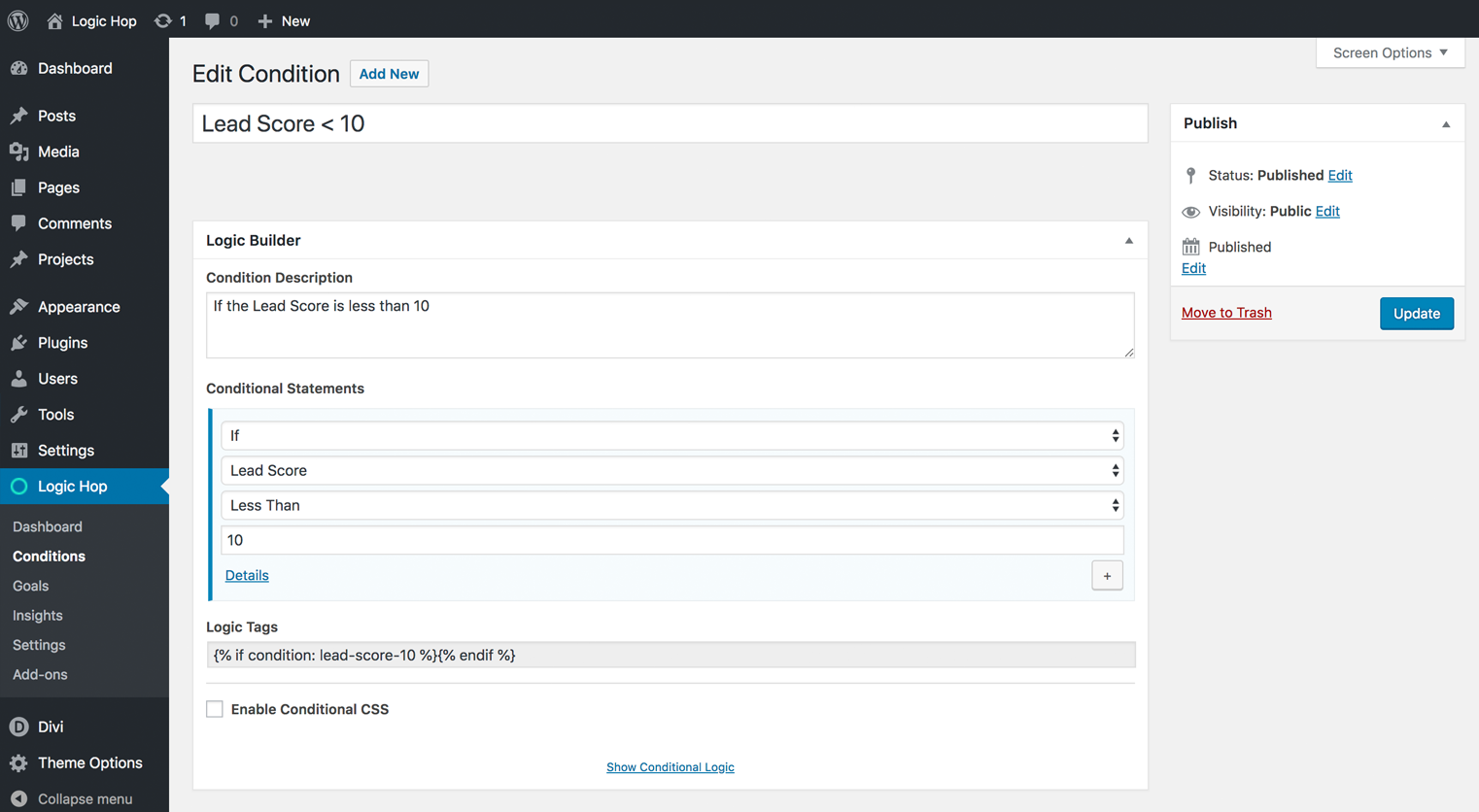
Logic Hop Condition Builder 
Logic Bar Builder - Header Bars & Pop-ups 
Logic Hop Palette - Conditions 
Logic Hop Palette - Goals 
Logic Hop Palette - Data Variables 
Logic Hop Page/Post Tools 
Logic Hop Settings
Blocks
This plugin provides 3 blocks.
- Logic Hop Goal
- Logic Hop Conditional Goal
- Logic Hop Condition
Installation
- Click “Add New” from the Plugins page in your WordPress Dashboard
- Enter “Logic Hop” in the “Search Plugins” field
- Locate Logic Hop and click “Add Now” followed by “Activate”
- Follow instruction on the Settings page and retrieve a 14 days test license.
- Visit the Logic Hop Settings page and follow the instructions to configure Logic Hop
FAQ
-
What does Logic Hop do?
-
Logic Hop brings the power of personalization to WordPress with click-to-build rules that display content based on over 40 pieces of data.
Logic Hop goals allow you to track and measure user activity.
-
I don’t have a Logic Hop Account. How can I get one?
-
You can sign up for a Logic Hop account at LogicHop.com
-
Who should use Logic Hop?
-
Logic Hop is perfect for e-commerce websites, marketers, growth hackers, affiliate marketers, developers and small businesses that want to add personalization to WordPress.
-
What are Add-on Integrations?
-
Add-on Integrations are plugins that extend Logic Hop to provide functionality for plugins and third-party services such as Beaver Builder, Elementor, Divi, Gravity Forms, Google Analytics, WooCommerce and ConvertKit.
-
What’s required to use Logic Hop?
-
Logic Hop requires WordPress version 4.9.6 or higher and PHP version 5.4 or higher.
Logic Hop works does not work with sites hosted on WordPress.com or WordPress.com VIP.
-
Do I need a programmer to use Logic Hop?
-
Definitely not. Our click-to-build tools allow you easily create conditional logic and goals without any programming knowledge.
-
Does Logic Hop work with caching?
-
Yes!
-
Is Logic Hop GDPR Compliant?
-
Yes!
Reviews


Contributors & Developers
“Logic Hop – Dynamic Content Personalization for WordPress” is open source software. The following people have contributed to this plugin.
Contributors
Translate “Logic Hop – Dynamic Content Personalization for WordPress” into your language.
Interested in development?
Browse the code, check out the SVN repository, or subscribe to the development log by RSS.
Changelog
3.8.8
- WordPress 6.4.1 tests
3.8.5
- Fix Installation issues
3.8.4
- Tests with latest WP and PHP version.
3.8.3
- No more Need for Local Storage Plugin.
3.7.1
- Fix evaluation of IN conditions with newer PHP versions
3.7.0
- Improve error messages when Local Storage plugin is missing and data plan isn’t enabled.
- Segment conditions in condition builder by category to ehance usability.
- Improve Integrations discoverability.
3.6.4
- Remove “Quick Transients” helper in Logic Hop Settings
- Update Logic Hop Support contact details
- Check True-Client-IP header when attempting to geolocate user
3.6.3
- Add logichop_do_redirect filter
- Add logichop_do_redirect_via_shortcode filter
3.6.2
- Added logichop_php_condition_evaluted hook
- Fixed XML error on dashboard
3.6.1
- IMPORTANT: View the update notice before updating – https://logichop.com/docs/logic-hop-update-notices/
- Fixed minor issue when calling PHP class
3.6.0
- IMPORTANT: View the update notice before updating – https://logichop.freshdesk.com/support/solutions/articles/80000947722-logic-hop-update-notices/
- Fixed Site Health Status Critical Issue “An active PHP session was detected”
3.5.5
- Fixed issue preventing Redirects from appearing under the Logic Hop menu
3.5.4
- Fixed issue where admin-ajax.php wouldn’t load existing Goal Groups
3.5.3
- Fixed issue where Logic Hop cookie wasn’t set in Javascript Mode with homepage set to “Your latest posts”
3.5.2
- Added Javascript polyfill option for Internet Explorer 11 support
3.5.1
- Minor update to prevent PHP warnings when HTTP_ACCEPT_LANGUAGE not set
3.5.0
- Replaced deprecated media_buttons_context hook with media_buttons
- Added samesite and secure parameters for logichop cookie
- Added logichop_apply_custom_logic filter to allow override when evaluating conditional logic
- Added new conditional logic in_reverse, in_reverse_i, not_in_reverse, not_in_reverse_i
- Added setting to disable geolocation
- Fixed data preview tool – Always loads most live data
3.4.9
- Added filters to support custom taxonomies
3.4.8
- Added condition builder filter logichop_admin_condition_builder
3.4.7
- Fixed issue where conditional widgets would not save properly
3.4.6
- Fixed issue causing Site Health check to fail for REST API requests and Loopbacks
- Disabled Logic Hop during REST API calls, WP Cron jobs, and core admin-ajax actions
3.4.5
- Fixed issue with WordPress 5.3.0 where Logic Hop settings would not save
3.4.4
- Fixed issue where Logic Bar page height was not being updated when a Logic Bar Pop-Up was also active
3.4.3
- Changed anchor link goal functionality from Javascript to PHP
3.4.2
- Fixed minor issue with anchor link goals
3.4.1
- Added ability to set/delete Goals in anchor links
- Updated Data Preview Tool CSS
- Fixed potential PHP warning
3.3.9
- Fixed PHP Warning associated with Logic Bars
3.3.8
- Added CSS class .logichop-visible to Conditions and Logic Blocks after they are rendered.
3.3.7
- Added logichop_get_client_ip filter to override IP Address during local development
3.3.6
- Added logichop_anti_flicker_css filter to optionally bypass anti-flicker
- CSS fix for legacy versions of Yoast SEO plugin
3.3.5
- Added variable support to redirects
- Fixed HTML element replacement issues
- HTML element replacement data-type supports href, src, value and auto-detects , , – href & src replace #VAR#
- data-goal supports delete goal by using data-delete
- Added .logic-bar-dismiss class
- Changed JS session display function to logichop_session_display()
- Added parseUrlVariables() method for redirects
- Added hook logichop_user_data_set after user data is loaded
- Added OS detection and conditions
3.3.4
- Support for Language, Landing Page, Cookie, and Server conditions
- Duplicate option for Logic Hop functionality
- Anti-Flicker mode for sites using caching
- Quick Settings to help simplify Settings page
- Logic Bars as pop-up windows with display timing options
- Fixed issue where redirects were missing query string data
- Fixed potential conflict with plugins/themes using plugin activation class improperly
3.3.3
- Updated Data Preview Tool to allow for overriding nested arrays
3.3.2
- Added logichop_parse_payload action and JS method for setting data
3.3.1
- Added URL Path conditions
- Fixed issue causing a PHP warning
3.3.0
- Fixed issues causing PHP warnings
3.2.9
- Adding support for total site visits
- Small code refactor to improve performance
3.2.8
- Fixed Goal Group issue where groups larger than 10 were not updating properly
3.2.7
- Update to user data storage and retrieval
3.2.6
- Added functionality to facilitate local data storage
3.2.5
- Added data tool for previewing conditions
3.2.4
- Changed Transients class loading sequence when Transients are enabled
- Added [logichop_embed] shortcode for dynamic content embeds
3.2.3
- Moved cookies from PHP setcookie() to Javascript cookie
- Added option to use Transient storage instead of PHP Sessions
- Added optional Cron job to delete expired Logic Hop transients
3.2.2
- Added Nested Logic Tags as experimental option
- Added Goal Groups for easy user segmentation
- Added routines for plugin update notifications
3.2.1
- Added new hooks and Javascript methods to support custom post types and taxonomies
- Added conditional support for taxonomies such as categories and tags
- Added JSON data for SPF event-update to bundle update requests into a single call
3.2.0
- Added new hooks and filters to better support third-party add-ons
3.1.9
- Added JS promises for variables & debugging
- Added new hooks to support page builder add-ons
- Added utility methods to support new functionality
- Added page-by-page option for rendering Logic Tags in Classic and Gutenberg editors
3.1.8
- Added alerts and plugin requirements for Pantheon hosting
- Added Cookie Name to change default logichop cookie name for Pantheon cookie compatibility
3.1.7
- Added Logic Hop redirects for allowing multiple conditional page/post redirects
3.1.6
- Added Javscript variables and lookup function for when JS variables are enabled
- Added GDPR specific array for geolocation lookup with additional GDPR countries
- Added Condition and Goal slug field for easier identification
3.1.5
- Added Custom Data Object functionality to make third-party data integrations easier to implement
3.1.4
- Updated Logic Blocks to support shortcodes
- Added logichop_condition() Javascript function for evaluating conditions
3.1.3
- Added Logic Hop Recipe upload functionality
- Fixed condition builder “zero” value issue
3.1.2
- Updated IP lookup to properly support NGINX
3.1.1
- Added Logic Bar option for sticky/non-sticker header
- Added Logic Bar option to enable/disable drop shadow
- Added Logic Bar close control
- Updated Logic Bar z-index
3.1.0
- Added Logic Blocks for easy CTA creation
- Added Logic Bars for easy CTA creation
- Added user specific date/time conditions
3.0.9
- Added Goal delete functionality
- Added Query String contains/does not contain & Query String Session contains/does not contain
- Added routine to clear transients when plugin is updated
3.0.8
- Fixed Javascript error when displaying variables with blank value
- Goal data API parsing to omit 0 value goals
- Improved Gutenberg variable support
3.0.7
- Added preliminary Gutenberg support
- Enabled Lead Score value of 0 to be set and displayed
3.0.6
- Added Toolbar menu item for Admin section
- Added custom post type support in condition builder for add-ons
- Moved to SPF version 3.1
3.0.5
- Added Toolbar menu item to control Logic Hop preview tool
3.0.4
- Changed conditional wraps to
<
div> from for better handling with WP auto-formatting
* Added CSS classes .logichop-condition & .logichop-widget to allow overrides of display: none; setting
* Added LH configuration setting to diable wpautop filters
3.0.3
- Fix to prevent filter from overriding some data variables
3.0.2
- Added CSS classes .logichop-fade-in .logichop-slide-down to hide content blocks
- Added post-load Javascript calls to fade-in and slide-down hidden content blocks
3.0.1
- Added ability to set Lead Score from page/posts and goals
- Added variable prepend and append option
- Added variable support for conditional if/elseif/else
- Changed conditional wraps to from
<
div>
* Fixed issue with {{ goal: ##goal## }} handling
* Fixed styling issue with DIVI theme
3.0.0
- Added tools for GDPR compliance
- Moved to account-based model to help ensure GDPR compliance
- Added new conditional logic tools and liquid-style syntax
- Added WPEngine detection and object caching support
- Added WPBakery Page Builder Support