Title: Breadcrumbs Divi Module
Author: learnhowwp
Published: May 7, 2020
Last modified: December 14, 2025
---
Search plugins
# Breadcrumbs Divi Module
By [learnhowwp](https://profiles.wordpress.org/themeythemes/)
[Download](https://downloads.wordpress.org/plugin/breadcrumbs-divi-module.1.2.4.zip)
* [Details](https://en-nz.wordpress.org/plugins/breadcrumbs-divi-module/#description)
* [Reviews](https://en-nz.wordpress.org/plugins/breadcrumbs-divi-module/#reviews)
* [Installation](https://en-nz.wordpress.org/plugins/breadcrumbs-divi-module/#installation)
* [Development](https://en-nz.wordpress.org/plugins/breadcrumbs-divi-module/#developers)
[Support](https://wordpress.org/support/plugin/breadcrumbs-divi-module/)
## Description
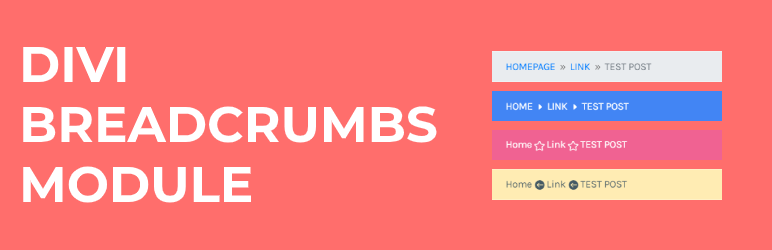
The Divi Breadcrumbs plugin enhances your website by adding a customizable Breadcrumbs
module to the Divi Builder. Breadcrumbs improve user experience by providing a clear
navigational path, helping visitors understand their location within your site and
easily backtrack to previous sections.
Features
* **Visual Builder Supported**: Enjoy seamless integration with Divi’s Visual Builder.
You can drag and drop the Breadcrumbs module into your layout.
* **Customizable Home Text**: Define your own text for the home link in the breadcrumbs,
offering more flexibility in how you label the starting point.
* **Before Text Option**: Add a custom text that appears before the breadcrumbs,
providing additional context to your breadcrumbs.
* **Icon Options**: Choose from Divi’s icon library to use as the separator between
breadcrumb links. You can also add a custom icon before the breadcrumbs to further
personalize their appearance.
* **Custom Home Link**: If you need to link the home breadcrumb to a custom URL,
this option allows you to do so.
* **Color Customization**: Tailor the colors of your breadcrumbs to align with
your site’s design:
- **Link Color**: Set a custom color for breadcrumb links and define a different
color for the hover state, ensuring your breadcrumbs.
- **Separator Color**: Customize the color of the separator icon.
- **Current Text Color**: Specify a color for the text of the current page,
helping users easily identify their current location.
For a live demonstration and to see the Breadcrumbs module in action, visit [Breadcrumbs Demo Page](https://www.learnhowwp.com/divi-breadcrumbs-module/).
The content generated in the Visual Builder is only for preview. Part of the Breadcrumbs
in the Visual Builder is dummy data but don’t worry you will see the correct breadcrumbs
on the front end after you exit the builder.
**More Free Divi Plugins**
* [Divi Contact Form DB](https://wordpress.org/plugins/contact-form-db-divi/)
* [Divi Post Carousel Module](https://wordpress.org/plugins/post-carousel-divi/)
* [Divi Overlay on Images Module](https://wordpress.org/plugins/overlay-image-divi-module/)
* [Divi Menu Cart Module](https://wordpress.org/plugins/menu-cart-divi/)
* [Divi Flip Cards Module](https://wordpress.org/plugins/flip-cards-module-divi/)
* [Divi Breadcrumbs Module](https://wordpress.org/plugins/breadcrumbs-divi-module/)
* [Divi Image Carousel](https://wordpress.org/plugins/image-carousel-divi/)
If you have any questions or feature ideas please create a new thread in Support.
## Screenshots
* [[
* [[
## Installation
1. Upload `lwp-divi-breadcrumbs.zip` to the `/wp-content/plugins/` directory
2. Activate the plugin through the `Plugins` page in your `WordPress Dashboard`.
## FAQ
### Where can I access the module?
After you activate the plugin a module should automatically appear in the module
list. The name of the module is Breadcrumbs
### Why does the Breadcrumbs content in the Visual Builder look different from the front end?
The content generated in the Visual Builder is only for preview purposes and includes
dummy data. This is to help you visualize how the Breadcrumbs will look in the layout.
However, the actual Breadcrumbs that appear on the front end of your site will reflect
the correct hierarchy of your pages or categories once you exit the builder.
### What is the purpose of the ‘Home Text’ setting in the Breadcrumbs module?
The ‘Home Text’ setting allows you to customize the text that is displayed for the
home link in the breadcrumbs. By default, it is set to ‘Home’.
### What does the ‘Before Text’ setting do?
The ‘Before Text’ setting allows you to specify any text that you want to display
before the breadcrumbs.
### How can I change the icon used as a separator in the breadcrumbs?
You can change the separator icon in the breadcrumbs by using the ‘Separator Icon’
setting. This setting allows you to select an icon from the available options.
### What is the ‘Add Before Icon’ setting used for?
The ‘Add Before Icon’ setting allows you to add an icon before the breadcrumbs.
You can choose the icon from the available options.
### How can I use a custom link for the Home item in the breadcrumbs?
You can use a custom link for the Home item by enabling the ‘Use Custom Home Link’
setting and then providing the link in the ‘Custom Home Link’ setting.
### How can I change the color of the links, separator, and current text in the breadcrumbs?
You can change the color of the links, separator, and current text in the breadcrumbs
module by using the ‘Link Color’, ‘Separator Color’, and ‘Current Text Color’ settings
respectively. These settings allow you to choose a custom color for each element.
### What happens if I don’t see the breadcrumbs on my page?
If you don’t see the breadcrumbs on your page, it could be because there are no
parent pages or categories for the current page. Breadcrumbs are generated based
on the hierarchy of your pages or categories.
### What if I can’t find a specific feature or setting in the plugin?
This is a free plugin and it comes with a set number of features. If you are unable
to find a specific feature or setting, it is likely that it was not included in
the initial development of the plugin. In such cases, please feel free to open a
feature request on the support page. All the features provided by this plugin are
listed in the plugin description.
## Reviews

### [Solved a problem that was plaguing me](https://wordpress.org/support/topic/solved-a-problem-that-was-plaguing-me/)
[The Moss Report](https://profiles.wordpress.org/mossreports/) September 26, 2025
Hey thanks for this plugin. I struggled with all my options using Divi and Divi
Supreme and Yoast breadcrumbs. I couldn’t get any of those to correctly display
the hierarchy of the categories, but yours did it perfectly! Also, I was wondering
how to get rid of the word ‘Category:’ in the breadcrumbs and that question was
answered cleanly in your support threads. Perfect now! Many thanks again. Ben

### [Was 5 stars, but seems to have been abandoned](https://wordpress.org/support/topic/working-great-and-easy-to-use/)
[The Old Man](https://profiles.wordpress.org/graham-smith/) December 30, 2023
Sadly seems to be no longer supported by the developer.
This was a 5 star plugin but no replies from support posts 5-6 months ago is poor
even for a free plugin. Seems to have become abandoned which is a huge shame as
it filled a big gap in DIVI functionality.

### [Does what is says.](https://wordpress.org/support/topic/does-what-is-says-85/)
[jaredmayer](https://profiles.wordpress.org/jaredmayer/) December 10, 2023
Always wanted a quick way to do this!

### [not user friendly & no response on forum to questions](https://wordpress.org/support/topic/not-user-friendly-no-response-on-forum-to-questions/)
[LoisReed](https://profiles.wordpress.org/loisreed/) September 18, 2023 1 reply
I am simply trying to change the “home” link to go to the “shop” page & there is
no setting to do this. When I went to the wordpress.org forum, this question has
been asked time and time again, with no response. Bummer 🙁

### [Super plugin !](https://wordpress.org/support/topic/super-plugin-1207/)
[jimmybwy](https://profiles.wordpress.org/jimmybwy/) June 22, 2023
Super plugin !

### [Works well](https://wordpress.org/support/topic/works-well-2780/)
[blockiq](https://profiles.wordpress.org/blockiq/) June 18, 2023
Great Plugin for my secondary navigation
[ Read all 14 reviews ](https://wordpress.org/support/plugin/breadcrumbs-divi-module/reviews/)
## Contributors & Developers
“Breadcrumbs Divi Module” is open source software. The following people have contributed
to this plugin.
Contributors
* [ learnhowwp ](https://profiles.wordpress.org/themeythemes/)
“Breadcrumbs Divi Module” has been translated into 3 locales. Thank you to [the translators](https://translate.wordpress.org/projects/wp-plugins/breadcrumbs-divi-module/contributors)
for their contributions.
[Translate “Breadcrumbs Divi Module” into your language.](https://translate.wordpress.org/projects/wp-plugins/breadcrumbs-divi-module)
### Interested in development?
[Browse the code](https://plugins.trac.wordpress.org/browser/breadcrumbs-divi-module/),
check out the [SVN repository](https://plugins.svn.wordpress.org/breadcrumbs-divi-module/),
or subscribe to the [development log](https://plugins.trac.wordpress.org/log/breadcrumbs-divi-module/)
by [RSS](https://plugins.trac.wordpress.org/log/breadcrumbs-divi-module/?limit=100&mode=stop_on_copy&format=rss).
## Changelog
#### 1.2.4
* Fixed icons displaying broken characters.
#### 1.2.3
* Fixed icon is deprecated warning
#### 1.2.2
* Fixed fatal error with number_format function caused by ?et_blog.
* Fixed label for ‘Before Icon’.
* Added option for custom home link.
* Fixed issue to prevent breadcrumb icon display on homepage when there were no
bredcrumbs to display.
#### 1.2.1
* Fixed Font Awesome icons not working.
* Fixed warning related to et_pb_get_font_icon_list being used
* Fixed PHP 8.0 error required parameters after optional parameter
#### 1.2
* Fixed the missing field position error caused when the parent category was a
substring of child category eg Videos > Videos of Something
#### 1.1
* Added hover controls on Link color
* Moved the styles options to the Design tab
* Added option to add a icon at the start of breadcrumbs
* Added RDFa to Breadcrumbs
#### 1.0.1
* Fixed the icon size in the Theme Builder
* Wrapped the before text in a span
#### 1.0
* First Release
## Meta
* Version **1.2.4**
* Last updated **4 months ago**
* Active installations **10,000+**
* WordPress Version ** 5.0 or higher **
* Tested up to **6.9.4**
* PHP Version ** 8.0 or higher **
* Languages
* [Dutch](https://nl.wordpress.org/plugins/breadcrumbs-divi-module/), [English (US)](https://wordpress.org/plugins/breadcrumbs-divi-module/),
[Japanese](https://ja.wordpress.org/plugins/breadcrumbs-divi-module/), and [Swedish](https://sv.wordpress.org/plugins/breadcrumbs-divi-module/).
* [Translate into your language](https://translate.wordpress.org/projects/wp-plugins/breadcrumbs-divi-module)
* Tags
* [breadcrumbs](https://en-nz.wordpress.org/plugins/tags/breadcrumbs/)[divi](https://en-nz.wordpress.org/plugins/tags/divi/)
* [Advanced View](https://en-nz.wordpress.org/plugins/breadcrumbs-divi-module/advanced/)
## Ratings
4.5 out of 5 stars.
* [ 12 5-star reviews ](https://wordpress.org/support/plugin/breadcrumbs-divi-module/reviews/?filter=5)
* [ 0 4-star reviews ](https://wordpress.org/support/plugin/breadcrumbs-divi-module/reviews/?filter=4)
* [ 0 3-star reviews ](https://wordpress.org/support/plugin/breadcrumbs-divi-module/reviews/?filter=3)
* [ 1 2-star review ](https://wordpress.org/support/plugin/breadcrumbs-divi-module/reviews/?filter=2)
* [ 1 1-star review ](https://wordpress.org/support/plugin/breadcrumbs-divi-module/reviews/?filter=1)
[Your review](https://wordpress.org/support/plugin/breadcrumbs-divi-module/reviews/#new-post)
[See all reviews](https://wordpress.org/support/plugin/breadcrumbs-divi-module/reviews/)
## Contributors
* [ learnhowwp ](https://profiles.wordpress.org/themeythemes/)
## Support
Got something to say? Need help?
[View support forum](https://wordpress.org/support/plugin/breadcrumbs-divi-module/)